How Windows Explorer in Windows 8 hasn’t learned to say no
During the spate of articles about Steve Jobs stepping down as Apple CEO, one of the major aspects of his success was put down to an ability to say no. This leaves Apple products with fewer features than those from its rivals, but, typically, superior usability and focus. The blog post Improvements in Windows Explorer rather starkly highlights the opposite approach. It traces the lineage of Microsoft’s file manager, from its hideous beginnings in Windows 1.0 through to the arrival of sanity in Windows XP. But then you get to Windows 8.
Over the years, Explorer has grown to support a number of different scenarios, many unrelated to file management – launching programs, viewing photos, playing videos, and playing music, to name just a few. We wanted to know which of these capabilities customers were really using. Using telemetry data, we were able to answer the question of how the broadest set of customers use Explorer in aggregate. As a reminder, the telemetry data is opt-in, anonymous, and private, but it does represent hundreds of millions of sessions from all customer types.
This data is pretty interesting. First it shows that even though there are over 200 commands in Explorer, customers use a small number of them with any real frequency: the top 10 commands represent 81.8% of total usage. Additionally it shows us that people overwhelmingly use Explorer for core file management tasks – the top 7 commands (72.2% of usage) are all for managing/manipulating files.
Apple’s clearly done similar testing with its applications over the years, in an effort to streamline. Finder has, if anything, simplified during OS X’s evolution. Therefore, it seems someone removed logic from the equation in allowing Microsoft’s Explorer team to do this:
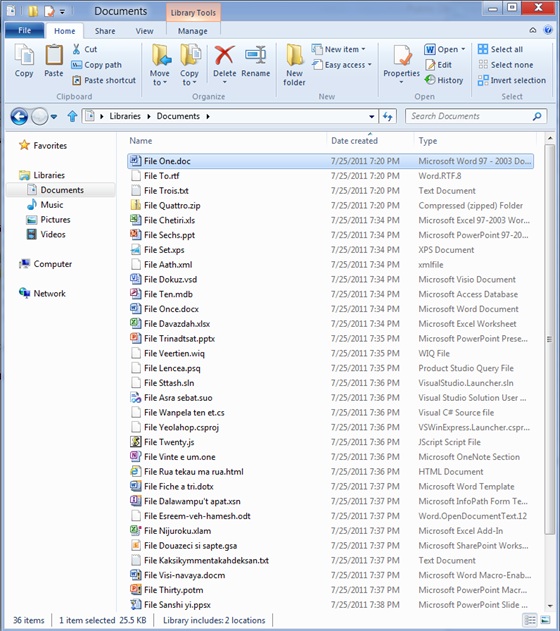
To be fair, the Ribbon can be hidden in Explorer, and that’s just as well, because Microsoft’s created a horrible mess that will intimidate newcomers: instead of concentrating in the “top 10 commends [that] represent 81.8% of total usage”, this new interface flings tons of options in your face. It’s also hard to tally this vision of the future of computing not only with Apple’s iOS but also Microsoft’s own Windows Phone OS, which is currently being smashed into Windows 7 with a hammer, to create the hybrid OS that Steve Ballmer seems to think everyone wants.
Perhaps Microsoft will emerge victorious. Maybe people really do want to run the ‘full’ version of Excel on a tablet device rather than the sleek and simpler Numbers on an iPad. But I’ve a sneaking suspicion the kind of craziness and chaos showcased in the Microsoft blog post rather shows the opposite. It’s complexity for the sake of it, and showcases an inability to say no to including something, ‘just in case’ a few users might need it.
That screenshot is shockingly hideous. It looks like something from an old version of KDE. What I find especially baffling is that not only is the new interface hideously over-complicated in the face of all the ‘Hey, most people only use a tiny percentage of what Explorer can do!’ talk, but that MS blog post also lists the percentage of people using each feature that is on the toolbar. Right in the middle of the toolbar, a button used by 1%. Less conspicious, tools supposedly used by 10% or more. Er.
Astonishing.